
Once Clash Verge is configured, daily interaction shrinks to a handful of actions: switch mode, change node, toggle system proxy or TUN. All of them live in the tray menu — and with global hotkeys on top, the main window can effectively retire.
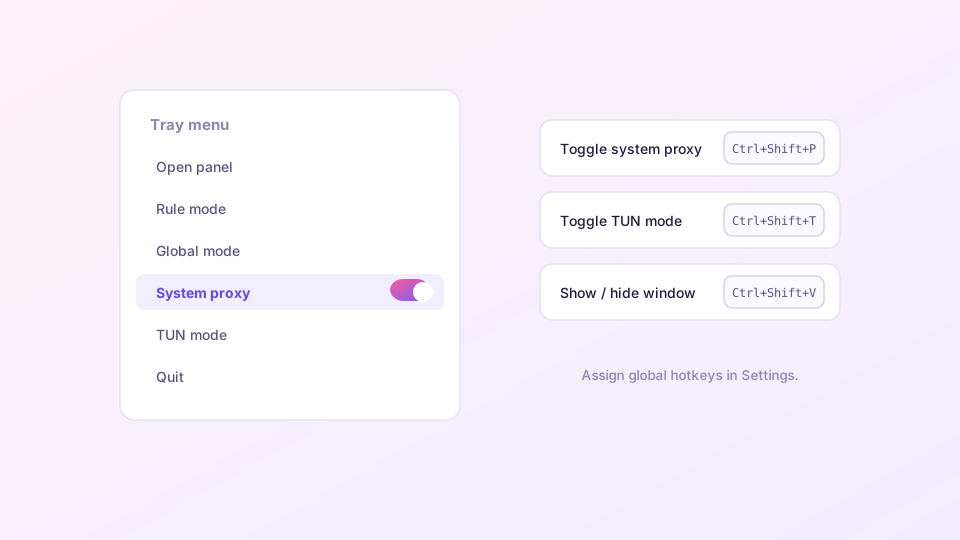
What the tray menu offers
Right-click the Clash Verge icon in the notification area (bottom-right on Windows, menu bar on macOS):
- Rule / Global / Direct: one-click mode switching, synced with the main UI;
- System Proxy / TUN Mode: both core toggles, directly checkable;
- Open panel: for the occasions you do need the window;
- Node selection: recent versions expose proxy groups as tray submenus.
Windows tucks tray icons into the overflow area. Pin it: Settings → Personalization → Taskbar → Other system tray icons → enable Clash Verge.
Assigning global hotkeys
Settings → Hotkey settings. These bindings work system-wide, whatever has focus:
| Action | Suggested combo |
|---|---|
| Toggle system proxy | Ctrl+Shift+P |
| Toggle TUN mode | Ctrl+Shift+T |
| Show / hide window | Ctrl+Shift+V |
Avoid combos your other software already owns (Ctrl+Shift+P opens a private window in some browsers). Conflicting hotkeys fail silently — if one does nothing, try a different combination.
Close means minimize, and that is intentional
Clicking the window's close button sends Clash Verge to the tray instead of quitting — the proxy process must keep running. Actually quitting is done from the tray menu. If your connection drops whenever you "close" the app, you have been hitting Quit; the distinction matters.
Combinations that work well
- Silent start + tray-only workflow: boot invisibly (autostart guide), manage everything from the tray;
- TUN on demand for gaming: bind the TUN hotkey, press it before launching the game, press again after — your regular downloads stay direct;
- Instant clean network: the system proxy hotkey shines before screen shares and demos.
To push further — controlling Clash from scripts or a Stream Deck — the HTTP interface is the tool: see the external controller API.