
A proxy is at its best when you forget it exists. Three switches in Clash Verge get you there: start with the system, start minimized, restore the previous state. All in Settings, one minute total.
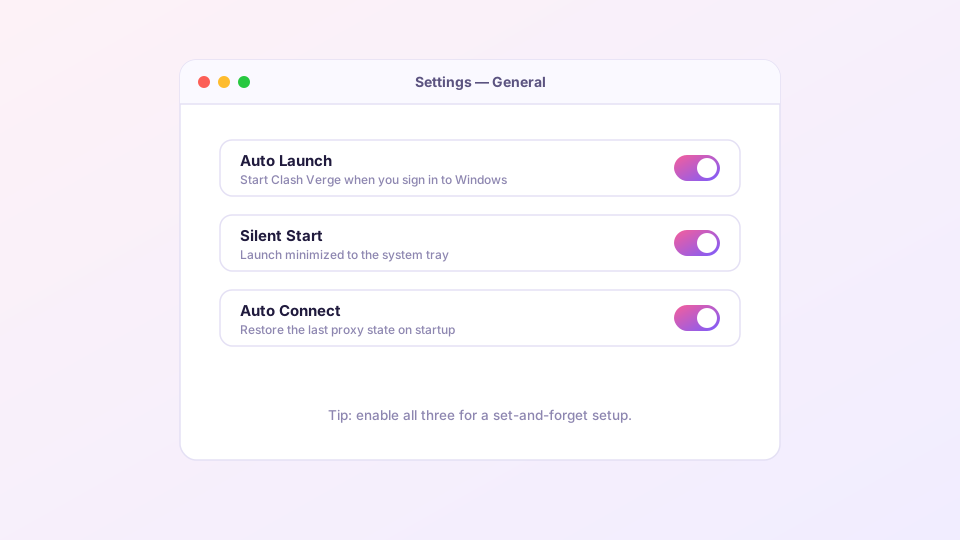
What each switch does
- Auto Launch: runs Clash Verge when you sign in;
- Silent Start: skips the main window, goes straight to the tray — paired with Auto Launch, boot becomes invisible;
- Auto Connect: restores the last state — if the system proxy was on with node X selected, that is exactly how it comes back.
With all three on: press the power button, reach the desktop, browser just works. You never touch Clash Verge.
Sponsored Where does the subscription link come from? Our partner provider gives you 1 GB of high-speed Hong Kong data at signup — import it in one click. Get high-speed nodesWhen autostart stops working on Windows
- Task Manager startup list: Ctrl+Shift+Esc → "Startup apps" — Clash Verge must read "Enabled". System "optimizer" utilities love disabling startup entries behind your back.
- Antivirus interference: some security suites block autostart registration silently; whitelist the app in their startup manager.
- Re-register: toggle Auto Launch off and on to rewrite the registry entry. It lives at
HKCU\Software\Microsoft\Windows\CurrentVersion\Runif you want to verify by hand.
Using Service Mode + TUN? Also confirm the service starts automatically: Win+R → services.msc → clash_verge_service → startup type "Automatic".
macOS and Linux equivalents
- macOS: the switch adds the app to Login Items. If it fails, add it manually under System Settings → General → Login Items.
- Linux: autostart uses a desktop entry in
~/.config/autostart/; any XDG-compliant desktop (GNOME, KDE) honors it.
Does autostart slow the machine down?
Clash Verge is a Tauri app: cold start in a second or two, memory in the 150–300 MB range. On any modern computer it is background noise. If you do see runaway memory, the culprit is elsewhere — see memory optimization.
What pairs well with this
Once the app lives in the tray, the tray menu and global hotkeys become your main interface — mode switching and proxy toggles without ever opening the window, covered in hotkeys and tray tips. Syncing this setup across machines: WebDAV backup.