
The millisecond figure next to each node is most people's only selection criterion. It is useful — but it does not measure what many assume it does. Understanding it makes the difference between picking a good node and picking a lucky one.
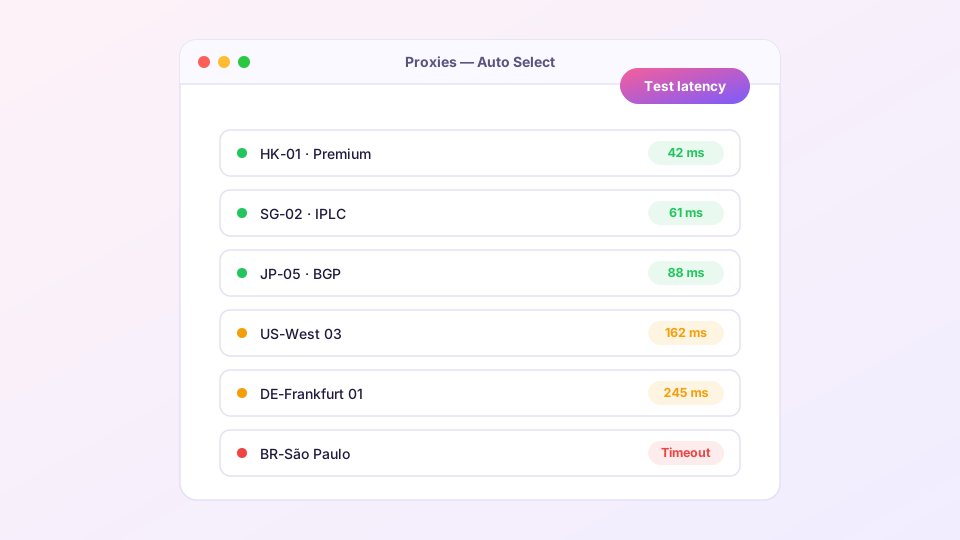
What the number measures
Hitting the lightning icon sends an HTTP request through each node to a test URL (Google's generate_204 by default) and times the full round trip. So the figure reflects the real path — you to the node, node onwards to the wider internet — which is far closer to actual experience than a plain ping to the server.
Reference ranges
- Under 200 ms: excellent — browsing, video and calls feel smooth;
- 200–400 ms: usable; pages feel slightly delayed, video is fine;
- Over 400 ms: workable but interactive apps stutter;
- Timeout: the node is down or temporarily blocked.
Low latency does not imply high bandwidth. A 50 ms node might cap at 10 Mbps while a 150 ms premium line saturates your connection. For 4K streaming, the only real test is playing the stream.
Letting the core choose: url-test groups
Most subscriptions include an "Auto" group (type url-test) that re-tests periodically and follows the fastest node. Leaving your selection on Auto is a fine default for browsing.
Two cases where manual selection beats auto:
- Streaming: auto-switching can land on a node that a streaming service refuses; pin a node you know unlocks it;
- Gaming: every automatic switch drops UDP sessions — in-game that is a disconnect. Pin a node; more in gaming optimization.
Everything times out?
- Confirm the underlying network works (turn the proxy off, load a local site);
- Update the subscription — providers rotate node addresses; see subscription management;
- Change the test URL to
http://cp.cloudflare.com/generate_204in Settings and re-test, to rule out the test target itself being blocked; - Still all red: the subscription has likely expired or the protocol is being blocked locally — ask your provider.
A node that is fast, then slow, then fast
Evening congestion (roughly 20:00–23:00 local time) on shared international lines is normal and universal. If a node is consistently slow, check how many connections it is carrying on the Connections page before blaming it. Switching your main group to fallback type — primary node with automatic backup — is a sturdy compromise; group configuration lives in the custom rules guide.