
"The proxy works in the browser but my game ignores it" — nine times out of ten this comes down to the difference between system proxy and TUN mode. Both feed traffic into the Clash core; they just intercept it at very different layers.
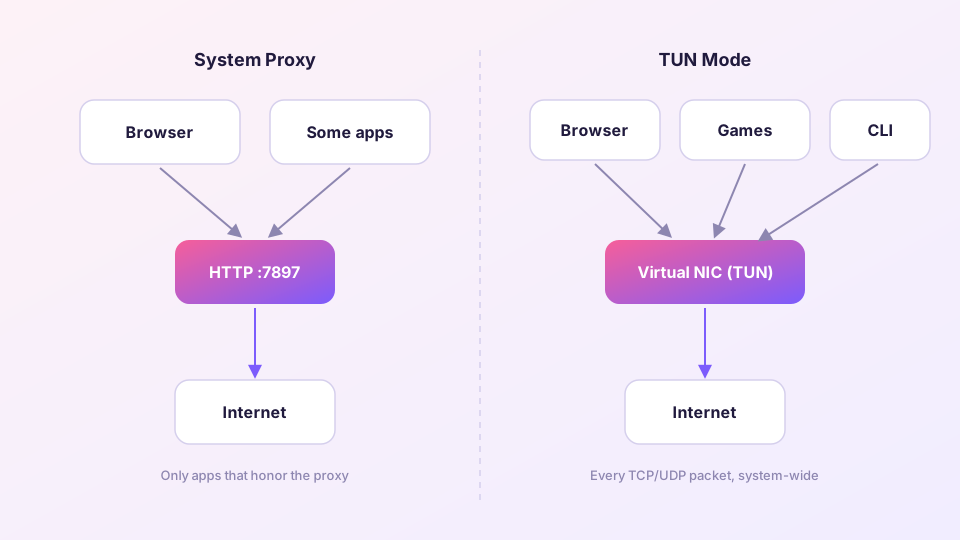
System proxy: a polite suggestion
Turning on the system proxy simply points the OS proxy setting at 127.0.0.1:7897. It is a notice pinned to the wall: "dear applications, kindly route your traffic here."
Whether an app complies is entirely up to the app:
- Browsers, store apps, most chat clients — comply, traffic flows through;
- Game launchers and many downloaders — ignore it and connect directly;
- CLI tools (git, curl, pip) — never read the OS setting; they need environment variables (see terminal proxy setup);
- UWP apps — blocked from reaching localhost at all by network isolation (see the UWP loopback fix).
TUN mode: taking the road itself
TUN creates a virtual network adapter and makes it the system's default route. From then on every TCP and UDP packet — cooperative app or not — passes through that adapter into the Mihomo core and gets routed by your rules. Games, terminals, system services: no exceptions.
The cost: it needs elevated privileges (Service Mode on Windows) and makes DNS handling more involved — TUN works best with fake-ip, covered in DNS settings and leak protection.
The decision table
| Your scenario | Use |
|---|---|
| Everyday browsing and streaming | System proxy — simple and sufficient |
| Gaming, voice chat | TUN (full UDP support) |
| git / docker / terminal tools | TUN, or per-tool environment variables |
| UWP apps (Store, Xbox) | TUN is the painless answer |
| Only one specific app should use the proxy | System proxy + that app's own proxy setting |
The two switches coexist happily. A common pattern: system proxy stays on all day, TUN gets flipped on when a game or CLI session needs it.
Verifying what actually goes through
Open the Connections page in Clash Verge: every live connection is listed with its originating process, matched rule and chosen node. Launch the app you care about and watch whether its entries appear — more reliable than any guesswork.
Decided on TUN? The setup walkthrough is in the TUN mode guide.