
The tunnel is up, sites load — but your DNS queries may still travel in the clear, announcing every domain you visit to the local network. That is a DNS leak, and it undoes much of the privacy the proxy provides. Here is how Clash handles resolution and how to close the gap.
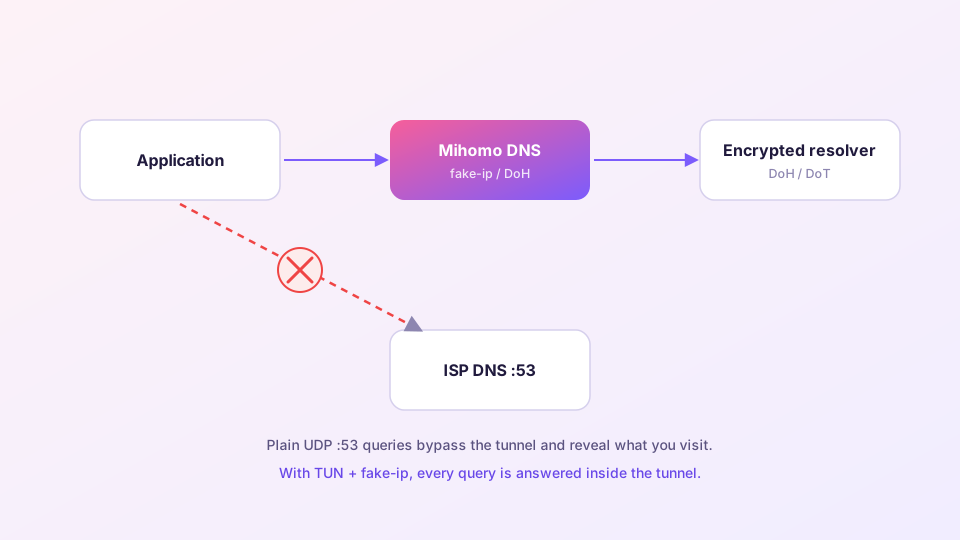
How the leak happens
With only the system proxy on, browsers typically let the proxy resolve names remotely — fine. But under TUN with careless DNS settings, or with apps that call the system resolver directly, queries fly out as plaintext UDP to your ISP's resolver on port 53. The payload goes through the tunnel; the intent was broadcast beforehand.
Sponsored Where does the subscription link come from? Our partner provider gives you 1 GB of high-speed Hong Kong data at signup — import it in one click. Get high-speed nodesClash's answer: own the resolver
Mihomo ships a DNS module with two modes:
- fake-ip (recommended): when an app asks for google.com, the core instantly answers with an address from a reserved range (198.18.x.x). The app connects to that fake address; the core maps it back to the domain and routes by domain rules. Real resolution happens at the proxy exit. The local network only ever sees fake addresses — no leak, and one round trip saved.
- redir-host: returns real IPs. More compatible with odd software, much leakier. Use only when a specific app genuinely fights with fake-ip.
A solid template
Put this in your Merge config (how) to override the subscription's DNS section:
dns:
  enable: true
  enhanced-mode: fake-ip
  fake-ip-range: 198.18.0.1/16
  fake-ip-filter:
    - "*.lan"
    - "+.local"
    - "+.msftconnecttest.com"   # OS connectivity checks need real answers
  nameserver:
    - https://1.1.1.1/dns-query
  fallback:
    - https://8.8.8.8/dns-query
  fallback-filter:
    geoip: true
Two ideas in there: resolvers are DoH (encrypted HTTPS), so even queries that leave outside the tunnel are not plaintext; and fake-ip-filter exempts LAN names and OS probes from fake addresses so printers and captive-portal checks keep working.
The last piece: DNS hijack under TUN
With TUN enabled, keep "DNS hijack" at its default any:53. It forcibly captures any remaining plaintext query — from apps that ignore every setting — into the core. TUN setup itself: TUN guide.
Testing for leaks
- With the proxy on, run the Extended test at dnsleaktest.com or browserleaks.com/dns;
- Every resolver listed should belong to your proxy exit's region or your configured DoH provider;
- Your ISP's resolver appearing in the list = leak. Re-check that fake-ip is active and DNS hijack is on.
After changing DNS settings, restart the core to clear the fake-ip cache. Mixed old/new mappings can make a few sites unreachable and look like a worse problem than it is.