
Editing the subscription file directly is the classic beginner mistake: the change works — until the next subscription update erases it. Clash Verge's answer is Merge and Script: your modifications live in separate files and are re-applied automatically on top of whatever the provider sends.
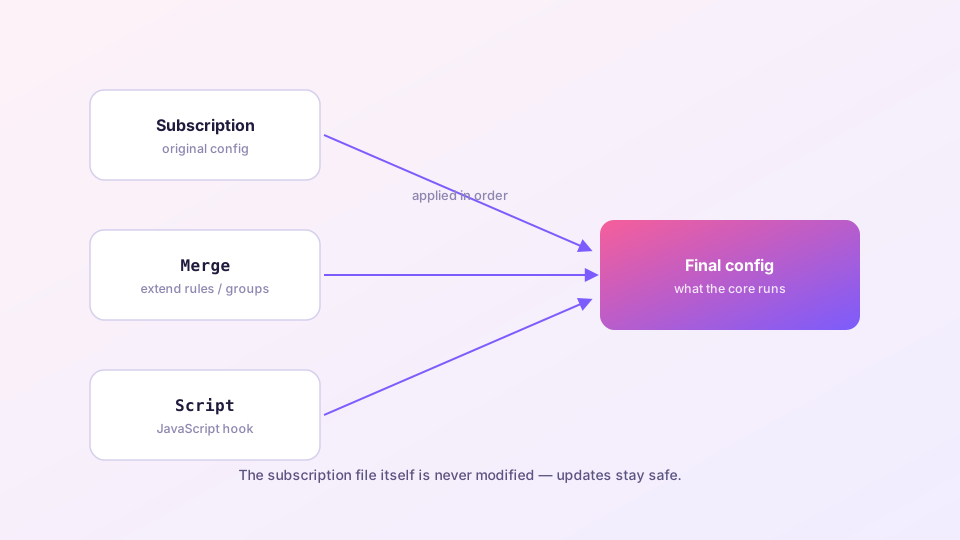
The pipeline
Each time the core loads a config: subscription text → Merge applied (declarative) → Script executed (JavaScript) → final config. Updates replace only the first stage; your layers persist and re-apply.
Where to edit: on the Profiles page, right-click for the global extension config (applies to every subscription), or right-click a specific profile card for its own Merge/Script (applies to that one only).
Sponsored Where does the subscription link come from? Our partner provider gives you 1 GB of high-speed Hong Kong data at signup — import it in one click. Get high-speed nodesMerge: covers ninety percent of needs
A Merge file is YAML with prefixed keys describing how to combine: prepend- (insert before), append- (add after), or a bare field name (replace outright).
# my rules first — highest priority
prepend-rules:
  - DOMAIN-SUFFIX,company-vpn.example,DIRECT
  - PROCESS-NAME,Telegram.exe,PROXY

# replace the DNS section entirely
dns:
  enable: true
  enhanced-mode: fake-ip
  nameserver:
    - https://1.1.1.1/dns-query

# add a group of my own
append-proxy-groups:
  - name: "Streaming"
    type: select
    proxies: [HK-01, SG-02]
Prepend vs append matters: rules that must win over the subscription's (say, forcing a domain direct) go in prepend; fallback additions go in append. Rule syntax itself: custom rules.
Script: for the dynamic cases
Anything Merge cannot express — conditional edits, bulk filtering, generated groups — goes in Script: a JavaScript function that receives the merged config and returns the final one.
function main(config) {
  // drop "informational" nodes (expiry notices, traffic counters)
  config.proxies = config.proxies.filter(
    p => !/expire|traffic|remaining/i.test(p.name)
  );
  // force UDP on for all vmess nodes
  config.proxies.forEach(p => {
    if (p.type === "vmess") p.udp = true;
  });
  return config;
}
An exception thrown in Script aborts the config load — the core keeps running the previous config. After editing, check the Logs page for errors before assuming your change took effect.
Changes not applying?
- Confirm you edited the profile that is currently selected (or the global extension config);
- Check the Logs page for YAML errors — one wrong indent invalidates the block;
- Right-click the profile → "Reactivate" to force a reload;
- Use the Connections page to see which rule traffic actually hits, verifying your prepend order.
If the three config sections are still fuzzy, read the config structure explained first — Merge makes much more sense afterwards.