
Your subscription works without you ever reading it — so why bother? Because the moment you want custom rules, need to debug misrouted traffic, or write a Merge patch, the config file is where the answers are. And it is genuinely simple: three main sections, half an hour to understand for good.
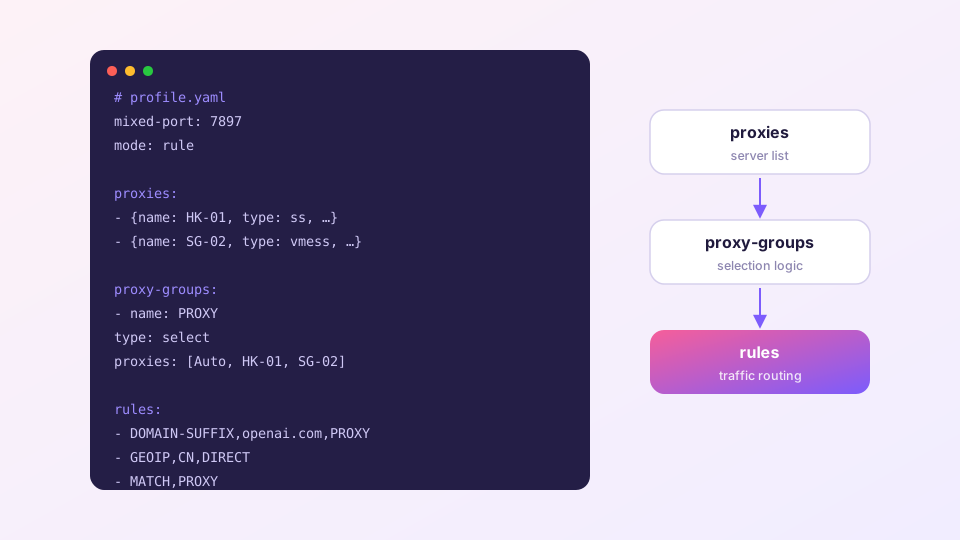
The global fields up top
mixed-port: 7897        # shared HTTP + SOCKS port
allow-lan: false        # accept connections from the LAN?
mode: rule              # rule / global / direct
log-level: info
external-controller: 127.0.0.1:9097   # control API address
In Clash Verge most of these are managed by the UI — changing the port or enabling LAN sharing in Settings is literally editing these lines for you.
Sponsored Where does the subscription link come from? Our partner provider gives you 1 GB of high-speed Hong Kong data at signup — import it in one click. Get high-speed nodesproxies: what a node looks like
proxies:
  - name: "HK-01"
    type: ss
    server: hk01.example.com
    port: 443
    cipher: aes-256-gcm
    password: "…"
  - name: "JP-05"
    type: vmess
    server: jp05.example.com
    port: 443
    uuid: "…"
    tls: true
type selects the protocol (ss/vmess/vless/trojan/hysteria2/tuic…); the remaining fields vary per protocol. Your provider generates this section — normally nothing to touch here.
proxy-groups: organizing the nodes
Groups are the strategy layer — the tabs you click on the Proxies page are these groups.
proxy-groups:
  - name: "PROXY"
    type: select          # manual choice
    proxies: [Auto, HK-01, JP-05]
  - name: "Auto"
    type: url-test        # fastest wins
    proxies: [HK-01, JP-05]
    url: "https://www.gstatic.com/generate_204"
    interval: 300
Groups nest (PROXY contains Auto), which is how subscriptions build "region → auto-select" hierarchies. Behavior of each group type is covered in node selection.
rules: the referee
rules:
  - DOMAIN-SUFFIX,openai.com,PROXY
  - DOMAIN-KEYWORD,github,PROXY
  - IP-CIDR,192.168.0.0/16,DIRECT,no-resolve
  - GEOIP,CN,DIRECT
  - MATCH,PROXY
Each rule is a triple: type, value, exit. The exit is a group name, DIRECT or REJECT. Matching runs top to bottom and stops at the first hit — order is priority. MATCH catches whatever nothing else claimed. Full syntax: custom rules guide.
Before you start editing
Never edit the subscription file itself — the next update overwrites it wholesale. Personal changes belong in Merge or Script layers: see enhancement configs.
To test your understanding, right-click your profile card → "Edit file" and read it section by section against this page — more instructive than any tutorial.