
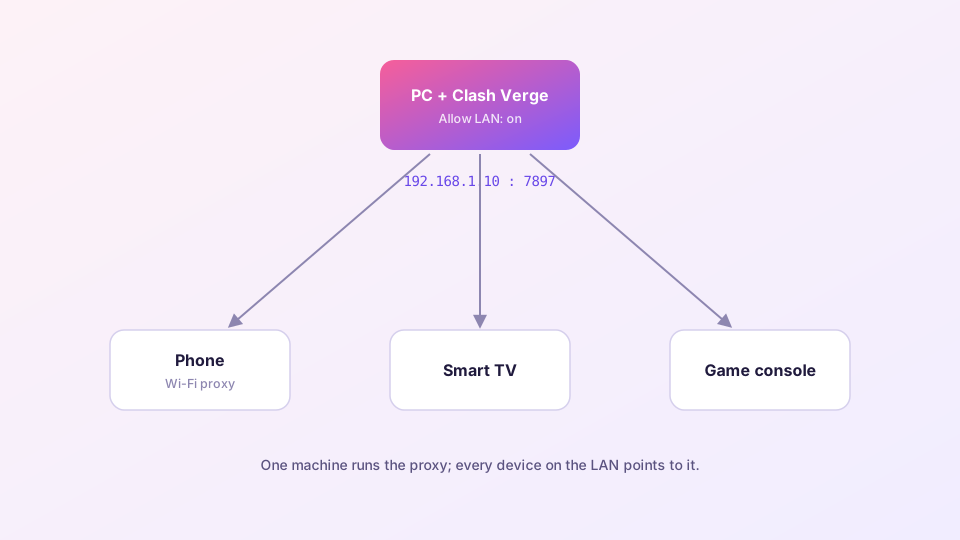
Your TV box cannot run a proxy client, and the Switch never will — but both can borrow the Clash Verge instance on your PC. One toggle on the computer, one proxy field on each device.
Step 1: Enable LAN access on the PC
In Clash Verge Settings, switch on Allow LAN. The core now listens on 0.0.0.0:7897 instead of loopback only, accepting connections from the network.
Note the PC's LAN address: run ipconfig (Windows) and read the IPv4 address of your active adapter — something like 192.168.1.10.
Reserve a static DHCP lease for the PC in your router. Otherwise its IP changes after a reconnect and every device's proxy setting silently breaks.
Step 2: Check the firewall
If the firewall prompt was denied when Clash Verge was first installed, LAN connections get dropped silently. Verify: Control Panel → Windows Defender Firewall → Allow an app — Clash Verge (or verge-mihomo) should be ticked for Private networks. Quick test from a phone browser: open http://PC-IP:7897 — any response at all means the port is reachable.
Step 3: Point each device at the PC
Phones (iOS / Android)
Same Wi-Fi → open the network's details → set proxy to Manual → server = PC IP, port = 7897. All HTTP/HTTPS traffic from the phone now routes through the PC's rules.
TVs and boxes
Look for a proxy option in network settings (sometimes buried under "advanced"). Devices with no proxy setting at all can still be covered by pointing their gateway at the PC — which requires the PC to run TUN mode.
Switch / PS5 / Xbox
Network settings → manual setup → proxy server → PC IP and 7897. Store downloads and online play route through; for gaming specifics (UDP!) read gaming optimization.
Troubleshooting
- Device connects but has no internet: is the PC's own proxy actually working? Firewall open? Is the Wi-Fi an isolated guest network (AP isolation blocks device-to-device traffic)?
- Slow: every device funnels through the PC's connection — and through its Wi-Fi twice if the PC is wireless. Wire the PC if you share heavily.
- Everything dies when the PC sleeps: set the power plan to never sleep, or share only while you are around.
A word on safety
Allow LAN opens your proxy to everyone on the network. Fine at home; on dorm, office or public Wi-Fi, either set an access secret (supported in recent versions) or keep the toggle off when not in use. For scripted, finer-grained control there is the external controller API.