
With the proxy on, the browser is happy — yet the Microsoft Store spins, the Xbox app refuses to sign in, new Outlook fetches nothing. Those are all UWP apps, and a Windows security rule stops them at the proxy's front door.
Why UWP specifically
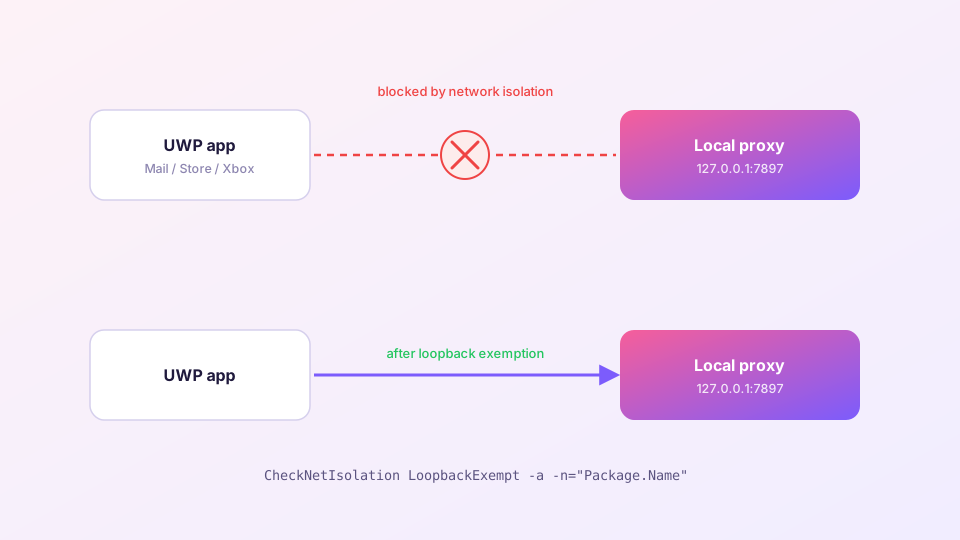
Windows sandboxes Store apps behind "network isolation", which by default forbids them from connecting to 127.0.0.1 — the loopback address. The system proxy points exactly there (127.0.0.1:7897). The UWP app dutifully reads the proxy setting, tries to comply, and gets slapped down by the OS. The result reads as "no network connection".
Classic Win32 desktop programs have no such restriction — hence the unaffected browser.
Sponsored Where does the subscription link come from? Our partner provider gives you 1 GB of high-speed Hong Kong data at signup — import it in one click. Get high-speed nodesFix 1: TUN mode (recommended, wholesale)
Enable TUN mode and traffic is captured at the network adapter — UWP apps never need to touch loopback, so the isolation rule has nothing to block. Every Store app starts working at once, no per-app ceremony. If you had any other reason to run TUN anyway (gaming, CLI tools), this settles it.
Fix 2: Loopback exemptions (surgical)
Prefer not to run TUN? Grant exemptions per app. In an elevated PowerShell:
1. Find package names
CheckNetIsolation LoopbackExempt -s   # currently exempted
Get-AppxPackage | Select Name, PackageFamilyName   # all installed packages
2. Exempt the ones you need
# Microsoft Store
CheckNetIsolation LoopbackExempt -a -n="Microsoft.WindowsStore_8wekyb3d8bbwe"
# new Outlook
CheckNetIsolation LoopbackExempt -a -n="Microsoft.OutlookForWindows_8wekyb3d8bbwe"
Effective immediately — reopen the app and test. To revoke, swap -a for -d.
For a GUI, Fiddler's WinConfig button lists every UWP app with checkboxes — the classic point-and-click way to manage exemptions.
What this fix is not for
- Store opens but downloads crawl — that is node or routing territory: node selection;
- Nothing at all can connect — the proxy itself is down: back to the quick start checklist;
- Windows Update ignoring the proxy — it uses system service channels; TUN mode is the answer there too.
Exemptions persist across reboots and updates. Unless you reset the app or reinstall Windows, it is a one-time task.