
"It won't open" is actually three distinct conditions: a blank white window, a process that dies immediately, or a UI that runs fine while nothing connects. Each has its own causes — find your symptom below and follow that branch.
Symptom 1: The window is blank
The UI process is alive but the rendering engine never started. In practice this is a missing or broken WebView2 runtime, endemic on stripped-down Windows images.
Pick one fix:
- Reinstall using the package marked
fixed_webview2from the download page — the runtime comes bundled; - Or install Microsoft's WebView2 Runtime (Evergreen) and keep your current install.
Symptom 2: Nothing happens, or it crashes at launch
- Rule out "hidden, not dead": check the tray — Clash Verge may have started minimized as designed. See silent start.
- Antivirus quarantine: proxy cores get flagged. Restore
verge-mihomo.exefrom quarantine and whitelist the install folder. If that worries you, verify the installer's hash first, then whitelist with confidence. - Corrupt window-state cache: happens after monitor or resolution changes. Delete the window-state file inside
%APPDATA%\io.github.clash-verge-rev.clash-verge-revand relaunch. - Full reinstall: last resort — follow clean uninstall and reinstall, backing up profiles first.
Symptom 3: UI fine, no connectivity
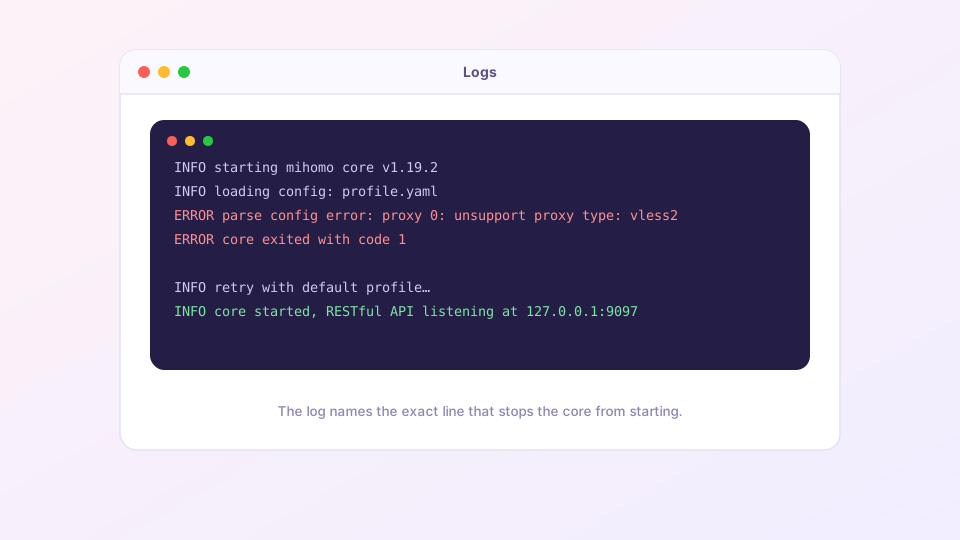
That is a core-level problem. Open the Logs page (level INFO or higher), restart the core, and read the first ERROR line:
| Log says | Meaning | Fix |
|---|---|---|
address already in use | Port taken | Port conflict fix |
parse config error | Config syntax/field error | The error includes a line number: subscription issues go to the provider; your own Merge/Script errors, fix that line |
unsupport proxy type | Subscription uses a protocol this core lacks | Update Clash Verge — new client ships a newer core |
start service error | Service Mode broken | Uninstall and reinstall the service from Settings, accept the UAC prompt |
| No ERROR at all | Core is healthy | The problem is nodes or rules — go to the quick start checklist |
Fast bisect: create an empty Local profile and select it. Core starts → your subscription or enhancement config is at fault. Core still fails → it is the app or system environment.
Asking for help that gets answered
When posting an issue or forum question, include three things: the Clash Verge version, your OS version, and the complete ERROR block from the logs. "It doesn't open, help" sits unanswered; a post with logs usually gets a reply the same day.