
Proxy clients are prime phishing bait: they handle all of your traffic by design, and users are so used to antivirus false positives that a real warning gets waved through. Five minutes learning to verify beats a week recovering from a trojaned installer.
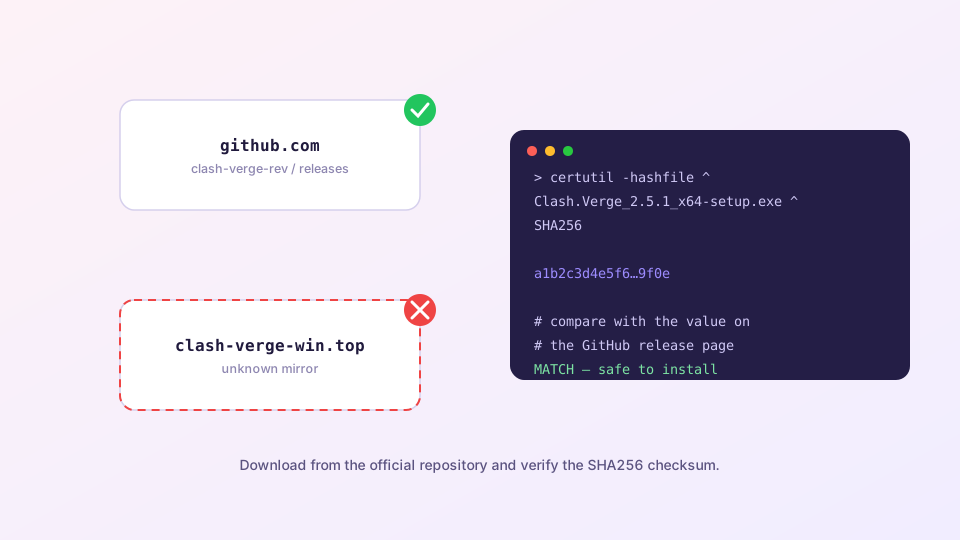
The single official source
Clash Verge Rev is published in exactly one place: the Releases page of clash-verge-rev/clash-verge-rev on GitHub. This site's download buttons link straight there with no intermediary. To judge any download link: the final download domain should be github.com or its object storage (objects.githubusercontent.com).
How fake sites give themselves away
- Asking for payment or registration — Clash Verge is free; any paywall is a fraud;
- Bundling "boosters" or "browsers" — the official installer bundles nothing;
- Impossible version numbers — anything above the GitHub latest is fiction;
- Wrong file names — the official Windows installer is exactly
Clash.Verge_2.5.6_x64-setup.exe; - Lookalike domains — clash-verge-win.top with screenshots of the real UI is the convincing kind.
The two-minute hash check
Each release file's official SHA256 is available on the GitHub release page (as an attached .sha256 file or in the release notes). Compute your download's hash and compare:
Windows
certutil -hashfile Clash.Verge_2.5.6_x64-setup.exe SHA256macOS / Linux
shasum -a 256 Clash.Verge_2.5.6_x64.dmg
sha256sum Clash.Verge_2.5.6_amd64.deb
The 64-character output must match the official value exactly. One character off means a modified or truncated file.
About antivirus flags, honestly
Even official builds occasionally trip an engine — traffic-forwarding code shares signatures with less friendly software; the whole category suffers this. The correct logic: source and hash verified → almost certainly a false positive, whitelist it. Source unknown → do not run it, flagged or not. Never reverse the logic into "no AV warning, must be safe".
Habits that keep you safe
- Bookmark this site or the GitHub Releases page; stop finding downloads through search results;
- Update only in-app or from the bookmark — see the update guide;
- Share GitHub links with friends, never installer files from chat groups;
- Already installed from a dubious source? Uninstall thoroughly, run a full scan, rotate important passwords, reinstall from the official source.