
Two audiences here: people leaving for good, and people doing a scorched-earth reinstall to fix something weird. The steps differ by exactly one decision — whether to back up first — so let us settle that, then run the checklist.
Reinstalling? Back up one folder
If this uninstall is a repair step, copy the config folder somewhere safe first (or take a WebDAV backup):
%APPDATA%\io.github.clash-verge-rev.clash-verge-revThat folder is your subscriptions, settings and enhancement configs. Caveat: if you suspect the configuration itself is what is broken (core refuses to start), do not restore the whole folder afterwards — just fish your subscription URLs out of the backup.
Sponsored Where does the subscription link come from? Our partner provider gives you 1 GB of high-speed Hong Kong data at signup — import it in one click. Get high-speed nodesThe standard removal, in order
1. Restore network settings, then uninstall
Before uninstalling, switch off System Proxy and TUN inside Clash Verge. Skipping this leaves the OS proxy pointing at a port that no longer answers — the classic "uninstalled it and now nothing loads" incident. Then: Settings → Apps → Clash Verge → Uninstall.
Already uninstalled and offline? Settings → Network & Internet → Proxy → turn off "Use a proxy server". Connectivity returns instantly.
2. Delete the leftover folders
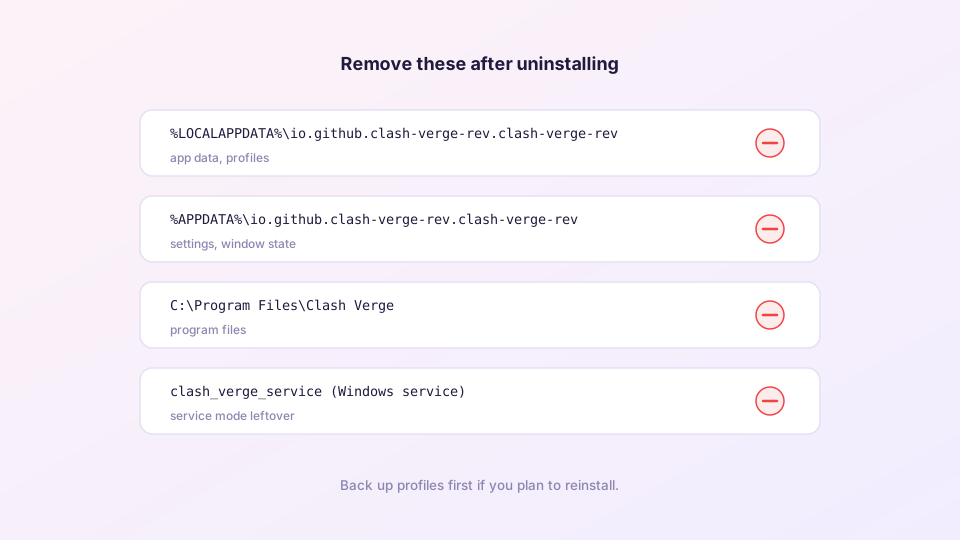
The uninstaller leaves user data behind by design. Remove both:
%APPDATA%\io.github.clash-verge-rev.clash-verge-rev
%LOCALAPPDATA%\io.github.clash-verge-rev.clash-verge-rev
(Paste each into the Explorer address bar.) The install directory C:\Program Files\Clash Verge normally disappears with the uninstaller; delete it manually if not.
3. Remove the service
Machines that used TUN have a background service. In an elevated PowerShell:
sc.exe query clash_verge_service     # does it exist?
sc.exe delete clash_verge_service    # remove it
macOS / Linux locations
# macOS — after trashing the app:
~/Library/Application Support/io.github.clash-verge-rev.clash-verge-rev
~/Library/Caches/io.github.clash-verge-rev.clash-verge-rev

# Linux — after removing the package:
~/.config/io.github.clash-verge-rev.clash-verge-rev
~/.local/share/io.github.clash-verge-rev.clash-verge-rev
Reinstall and restore
Grab the latest installer from the download page. Restoring config, two ways:
- WebDAV users: enter the server details, click Restore, done;
- Manual backup: launch the app once so it creates its folder structure, quit, overwrite the
%APPDATA%folder with your backup, relaunch.
Two post-reinstall chores: update the Geo databases and reinstall Service Mode if you use TUN. And if the reinstall did not cure the original problem — reinstalling repeatedly will not either; go back to symptom-based troubleshooting.